
HITL invoice extraction queue
HITL invoice extraction queue
Section titled “HITL invoice extraction queue”A small AP team handles inbound invoices. PDFs land in storage, an agent extracts vendor, dates, line items, and totals into a typed Postgres row with a confidence score on every field, and the row either auto-approves or escalates to a queue. Reviewers sign in to a Vite + React app, work the queue together, and approve invoices one by one — at which point a second agent assigns GL accounting codes per line item.
The running app shows a paged invoice on the left, a structured form on
the right populated by the extractor agent, a confidence pill next to
every value, presence avatars showing which other reviewer is on the
same item right now, and a per-item chat thread where reviewers can
@agent with a hint (“the invoice number is in the top-right of page 2”)
to make the agent re-run on a single field. New escalations stream into
the queue without a refresh; approvals make rows vanish from every
connected client at once.
The recipe’s protagonist is the structured-output-as-event-source
pattern: the agent’s output isn’t a paragraph of text, it’s a typed row
in Postgres. That row is queryable (you can join it against gl_codes
later and ask “all approved invoices over $10k from this quarter”), it
validates programmatically (sum of line items vs. total, before any
human sees the queue), and — crucially for this recipe — it’s also the
event that drives realtime: a row lands, every client sees it; a status
flips, the row vanishes from the queue. No separate pub/sub. No
hand-rolled event bus.
This recipe assumes you’ve worked through Recipe 01 — agent provisioning, KB uploads, and seed-script patterns aren’t re-taught here.
Powabase features used
Section titled “Powabase features used”- Sources — uploaded PDFs land in
ai.sources; the platform extracts page text + page images, which the recipe feeds to the extractor agent as context. - Knowledge Bases — one vendor-history KB used by the GL-coder agent
to look up historical similar line items + their assigned GL codes via
knowledge_base_search. - Agents — three of them: an extractor that reads a full document and emits the structured invoice shape; a field-extractor that re-runs on a single field with a reviewer hint; a GL-coder that fires after approval and assigns accounting codes per line item.
- Sessions, streaming — implicit (same pattern as Recipe 01); each agent run gets a session, the platform handles history.
- Auth (GoTrue) + RLS — reviewers sign in with email/password; RLS is configured for a shared workspace (every reviewer reads every item), which is the inverse of Recipe 01’s per-user scoping. The policy file calls this out as the recipe’s teaching moment.
- Realtime — Postgres Changes — subscriptions on
items,extraction_attempts,gl_codes, andchat_messagesmake the queue, the structured form, the GL codes panel, and the chat thread all live-update without polling. - Realtime — Presence — per-item channel
item:<id>:viewerspublishes{ profile_id, display_name }. The item-detail page renders the avatars of whoever else is on the same item.
Why this combination
Section titled “Why this combination”A multi-user review queue is the kind of feature that bolt-together stacks (one library for agents, another for vector search, another for realtime) make awkward. Each piece has its own delivery model and its own truth — the agent’s output sits in one place, the realtime fanout sits in another, and the application has to keep them in sync.
This recipe inverts that. The agent doesn’t emit a string; it emits a
typed Postgres row. The row is the truth (every client reads from
Postgres, RLS scopes who sees what), it’s the event (Postgres Changes
fans the INSERT / UPDATE out to every connected client), and it’s the
query target (you can join items against gl_codes and answer
business questions in SQL). One representation, three roles.
This is the recipe-shape that exercises all three Powabase pillars together: intelligent ETL (PDF → typed fields), multi-agent workflow (extractor → field-extractor → GL-coder, with each handoff a typed row), structured data output (the typed row is queryable, validatable, and realtime-broadcastable). Recipe 01 demonstrates the workflow pillar in isolation; this recipe demonstrates what happens when all three meet on one plane.
Prerequisites
Section titled “Prerequisites”- A Powabase project (this recipe was developed against
cookbook-02) OPENAI_API_KEYset in Project Settings → API Keys (the agents call the LLM)- Auth → Advanced Settings → Auto-confirm Email toggled ON (so sign-up establishes a session immediately for testing reviewer flows)
- Node 20+ / npm
psqlCLI for applying schema/policies- A modern Chrome/Firefox/Edge browser (the dev server is the recipe’s UI surface)
Architecture
Section titled “Architecture”This is what the recipe builds:
┌──────────────────────────────────────────────────────────────────────────┐│ Powabase project ││ ││ Postgres ─────┬─ ai.sources (uploaded PDFs + extraction) ││ ├─ ai.knowledge_bases (vendor-history KB for GL coder) ││ ├─ ai.agents (extractor / field-ext / gl-coder)││ │ ││ ├─ public.profiles (display_name, is_agent) ││ ├─ public.items (the queue: status, draft jsonb) ││ ├─ public.extraction_attempts (append-only history) ││ ├─ public.gl_codes (downstream output) ││ ├─ public.chat_messages (per-item thread) ││ │ ││ └─ auth.users (reviewers AND agent identities) ││ ││ Realtime ─── Postgres Changes (items, gl_codes, extraction_attempts, ││ chat_messages) + Presence (per-item viewers) ││ ││ Agents ──── extractor / field-extractor / gl-coder │└─────────────────────────────────┬────────────────────────────────────────┘ │ │ REST + SSE (agent runs) │ WebSocket (Realtime: Postgres Changes │ + Presence) │┌──────────────────────────────────┴────────────────────────────────────────┐│ Vite + React + TypeScript + @supabase/supabase-js ││ ││ /signin, /signup ─ GoTrue ││ /queue ─ live list of escalated items ││ /queue/:id ─ item detail: page-image viewer + structured-form ││ editor + presence avatars + chat thread │└────────────────────────────────────────────────────────────────────────────┘A few details worth noting up front:
- Agents are real auth users. Each of the three agents has a row in
auth.users(created by the seed script via the GoTrue admin API) and a correspondingpublic.profilesrow withis_agent = true. This keeps the schema symmetric — RLS policies don’t needor user_id is nullbranches, the chat-thread UI doesn’t special-case agent messages, and presence avatars render the same way for humans and agents alike. - The trigger for extraction is a recipe-side script, not a
webhook.
npm run trigger:extractionspollsai.sourcesfor newly-extracted PDFs that don’t yet have anitemsrow, runs the extractor against each one, and inserts the result. A--watchflag keeps it running for the live-demo phase. Production systems would use a Postgres trigger or webhook here.
Build it
Section titled “Build it”Seven steps. Each one is independently runnable and CLI-verifiable
before the UI lands. If you just want everything provisioned in one
shot, jump to npm run seed.
1. Schema + auth foundation
Section titled “1. Schema + auth foundation”schema.sql creates five tables: profiles (with display_name +
is_agent), items (the queue, with a draft_extraction jsonb and a
status enum), extraction_attempts (append-only history of every
extraction attempt against an item), gl_codes (downstream output of
the GL-coder), chat_messages (per-item thread). A BEFORE UPDATE
trigger on items recomputes _arithmetic_valid on every patch — the
client cannot be trusted to recompute on every patch path (inline
edits, agent re-extractions, future bulk operations).
create table public.items ( id uuid primary key default gen_random_uuid(), source_id uuid not null, status item_status not null default 'escalated', draft_extraction jsonb, extraction_error text, decided_by uuid references public.profiles(id), decided_at timestamptz, created_at timestamptz not null default now(), updated_at timestamptz not null default now());policies.sql is the recipe’s first teaching moment: this is a
shared workspace, not a per-user one. Every authenticated reviewer
reads and writes every row. If you came from Recipe 01, you’ll
reflexively reach for auth.uid() = user_id here — don’t. Per-user
scoping defeats the point of a queue.
-- TEACHING MOMENT: All items / chat / history are SHARED across the team.-- Recipe 01 scoped chat_sessions per-user with `auth.uid() = user_id`;-- that's WRONG here. This is a shared-workspace queue — every reviewer-- sees every item.create policy items_read on public.items for select to authenticated using (true);Apply with psql "$DATABASE_URI" -f schema.sql -f policies.sql. Then
sign up via @supabase/supabase-js and confirm a profiles row landed
for your user (the handle_new_user trigger does that automatically).
Run it
psql "$DATABASE_URI" -f schema.sql -f policies.sql# then exercise the auth path however you prefer; signup-and-check is in# seed-helpers.ts (used by `npm run seed`).You should see five tables and matching policies in public.*.
2. Extractor agent → everything escalates
Section titled “2. Extractor agent → everything escalates”Provision the extractor agent. Its system prompt asks for the full
structured invoice shape — vendor, invoice number, dates, line items,
subtotal, tax, total — each field as { value, _confidence }. The
agent reads the full document via context_override (no KB; this isn’t
a search problem, the recipe-side code already has the page text from
/api/sources/:id/page-texts):
const extractor = await api("/api/agents", { method: "POST", body: JSON.stringify({ name: "extractor", model: "gpt-5.4-mini", system_prompt: EXTRACTOR_PROMPT, // see seed-agents.ts settings: { reasoning_effort: "medium" }, }),});npm run trigger:extractions polls ai.sources for rows whose
extraction_status = 'extracted' and which don’t yet have an items
row, fetches each source’s page text, calls the extractor with that
text as context_override, and inserts the resulting items row.
Without the gates yet, every result lands with status = 'escalated'.
Narrative scaffold. For now every extraction escalates; auto-approval gates land in step 4. If the queue is showing nothing auto-resolved, that is expected — the gates are deliberately decoupled from the extractor so the validation logic (per-field confidence, arithmetic, required fields) is the focus of its own step.
Run it
npm run generate-samples # 6 sample PDFs into seed-content/npm run trigger:extractions # one-shotpsql "$DATABASE_URI" -c \ "select id, status, draft_extraction->'vendor'->>'name' as vendor from items order by created_at desc;"You should see one escalated row per uploaded sample, with
draft_extraction.vendor.name populated.
The six samples are intentionally varied so each exercises a different gate or HITL path you’ll wire up in later steps:
- Clean invoice — high-confidence everywhere, arithmetic checks out → auto-approves once gates are wired (step 4).
- High-value invoice — auto-approves, but the GL-coder will flag it
needs_cfo_review = true(step 4). - Tabular line-items invoice — clean prose fields but lower per-row confidence on the table → escalates.
- Arithmetic mismatch — totals don’t sum (subtotal + tax ≠ total) → escalates on validation despite confident per-field extraction. The structured-output-earns-its-keep example.
- Smudged / poorly-scanned invoice — low confidence on
invoice_number(the extractor picks up a vendor-internal reference number from page 1 instead of the canonical invoice number on page 2). The demo of the chat-hint @-mention re-extraction in step 7. - Multi-currency / odd format — escalates on extractor caution; demonstrates manual reviewer field edits.
3. Field-extractor agent (re-run mechanic)
Section titled “3. Field-extractor agent (re-run mechanic)”The field-extractor is a second agent, dedicated to re-running on a
single field. Its inputs: the source page text, the current
draft_extraction, a target_field (from a closed enum — see
seed-agents.ts for the supported set), and a free-form hint from
the reviewer. Its output: just { value, _confidence } for that one
field.
The closed enum is the right level of expressiveness for the recipe. Supported field paths look like:
vendor.namevendor.addressinvoice_numberinvoice_datedue_datesubtotaltaxtotalline_items[N].descriptionline_items[N].quantityline_items[N].unit_priceline_items[N].amountA small custom parser splits on . and [], validates the leaf path,
and applies the patch.
probe-field-extractor.ts exercises the flow from the CLI: pick an
item, pick a field, supply a hint, watch a new extraction_attempts
row land and the corresponding leaf on items.draft_extraction get
patched. The append-only invariant on extraction_attempts (no
UPDATE / DELETE policies) means the history is preserved.
Run it
npm run probe:field-extract# pass --item <uuid> --field invoice_number --hint "..." or rely on# the script's defaults (it picks the first escalated item).You should see attempt #1 (the original full extraction from step 2),
then attempt #2 — same item, target_field = 'invoice_number',
attempted_by = <field-extractor agent's profile id>, and the new
value reflected on items.draft_extraction.invoice_number.
4. GL-coder downstream + auto-approval gates
Section titled “4. GL-coder downstream + auto-approval gates”Two paired concepts here. (a) The GL-coder agent consumes an
approved item — it reads draft_extraction.line_items from context
and uses knowledge_base_search against the vendor-history KB to pull
similar historical line items + their assigned codes. Output: per-line
GL code + rationale + a needs_cfo_review flag (true if amount > $5k
or new vendor or unusual category). Results land in gl_codes, one row
per line item. (b) The auto-approval gates decide whether an
extraction goes straight to GL-coding or escalates to a human:
- Per-field confidence ≥ 0.85 for every field.
- Arithmetic validates:
sum(line_items[].amount) + tax = total, within $0.02 tolerance for rounding. - All required fields present (vendor.name, invoice_number, total, at least one line item).
If all three pass → status flips to approved and the GL-coder fires
immediately. Otherwise → escalated, lands in the queue. The
arithmetic check is the structured-output-earns-its-keep moment:
the agent could be 0.95 confident on every individual field and still
produce an extraction whose totals don’t math. Programmable validation
against the typed row catches that — something a string-output RAG demo
cannot do.
Run it
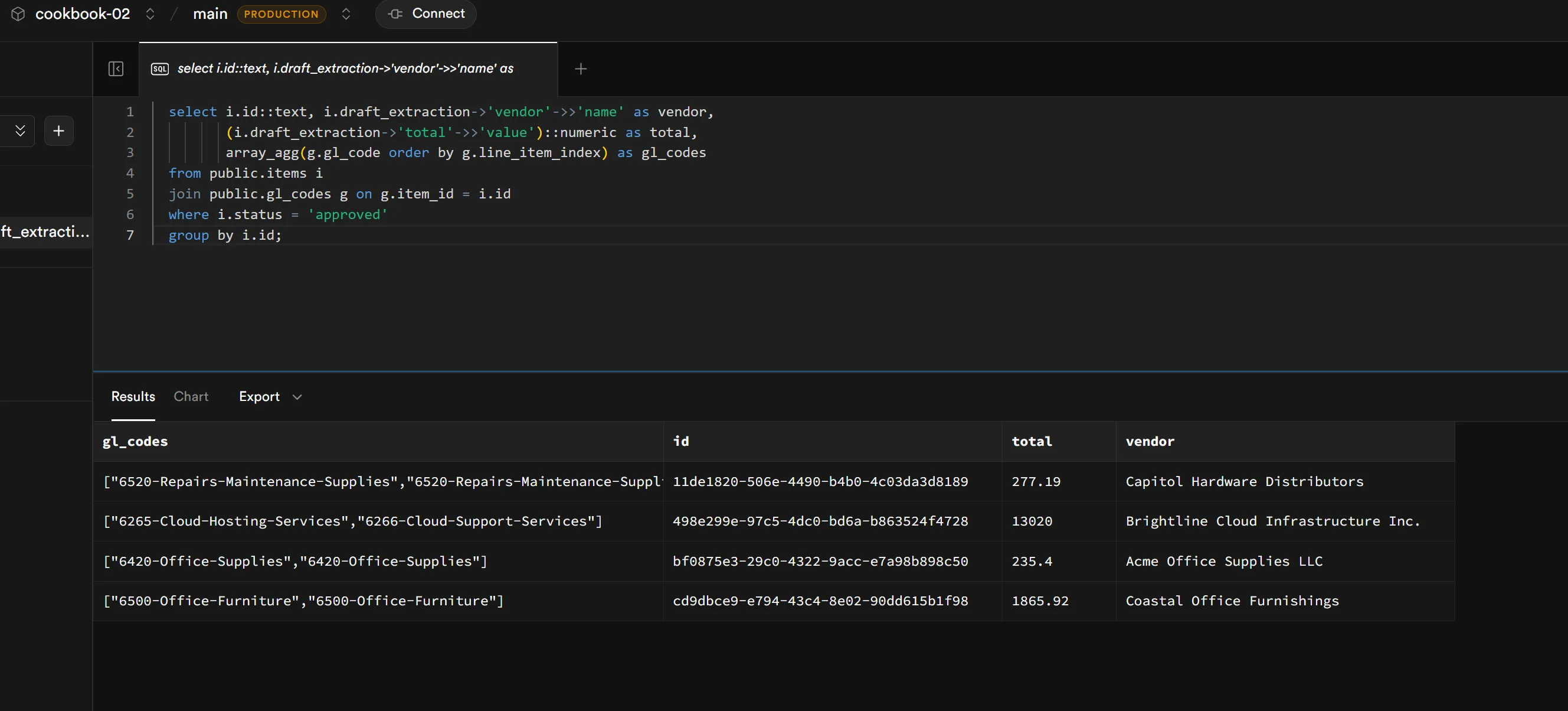
npm run probe:gl-coder # approve a clean item; watch gl_codes appearnpm run trigger:extractions # re-run; some samples now auto-approvenpm run dogfood # full assertion script: confirms the chainThen verify the typed-handoff chain (extracted invoice → approved item → GL codes) by joining tables in psql:
select i.id, i.draft_extraction->'vendor'->>'name' as vendor, (i.draft_extraction->'total'->>'value')::numeric as total, array_agg(g.gl_code) as codesfrom items ijoin gl_codes g on g.item_id = i.idwhere i.status = 'approved'group by i.id;The chain lands in queryable form — the recipe’s aha moment. Three agents, two table handoffs, one query.
5. Queue UI (no realtime)
Section titled “5. Queue UI (no realtime)”The Vite app under code/ has signin/signup pages plus the queue. The
queue page does an initial fetch of escalated items and renders a
list (vendor, total, due date, page-image thumbnail). Clicking a row
takes you to /queue/:id, a two-column detail view: page-image viewer
on the left, structured-edit form on the right with a confidence pill
next to every field, plus Approve / Reject buttons in the footer.
Inline edits patch items.draft_extraction and append a new
extraction_attempts row authored by the reviewer. The Approve button
flips status to approved and then fires the GL-coder client-side; on
return, the GL codes panel fills in.
// On Approve:await supabase  .from("items")  .update({ status: "approved", decided_by: userId, decided_at: new Date() })  .eq("id", itemId);
await fetch(`${BASE_URL}/api/agents/${GL_CODER_ID}/run`, {  method: "POST",  headers: { Authorization: `Bearer ${userToken}` /* ... */ },  body: JSON.stringify({ message: buildGlCoderPrompt(item) }),});
Verify the full HITL flow in one browser window: trigger extractions, open an escalated item, edit a field, approve, watch the GL codes panel fill. The app works without any realtime — that’s the deliberate setup for step 6.
Run it
cd codenpm installnpm run dev# open http://localhost:5173, sign up, work the queue6. Postgres Changes on the queue
Section titled “6. Postgres Changes on the queue”Subscribe to Postgres Changes on items, gl_codes, and
extraction_attempts. The natural triggers — new escalations from
npm run trigger:extractions -- --watch running in a side terminal,
approvals making rows vanish from the queue, GL codes appearing on
detail when the downstream agent finishes — demonstrate the realtime
layer without contrivance.
const channel = supabase .channel("queue-items") .on("postgres_changes", { event: "*", schema: "public", table: "items" }, (payload) => { // payload.eventType: 'INSERT' | 'UPDATE' | 'DELETE' // payload.new / payload.old: the row applyChangeToLocalQueue(payload); }) .subscribe();The lesson: rows changing in Postgres become events on the client, no polling. The queue is correctly modeled in steps 1–5; realtime in step 6 is a progressive enhancement on top of that model, not a mandatory piece of infrastructure.
A small reconnect pattern: the Supabase JS client auto-reconnects on
transient WebSocket drops, but events that happened during the gap are
gone. On SUBSCRIBED (which fires both on first subscribe and after
reconnect), the channel handler refetches the queue/item via REST so
any missed updates are caught. About five lines in the handler.
Run it
# Terminal A:npm run trigger:extractions -- --watch# Terminal B:cd code && npm run dev# open two browser windows side-by-side; sign in as different usersDrop a new PDF in seed-content/, watch it land in both browser
windows’ queue list at the same time. Approve in window A; watch the
row vanish from window B’s list. GL codes panel fills in window A’s
detail view as the GL-coder finishes.
7. Presence + chat thread + @agent targeted re-extraction
Section titled “7. Presence + chat thread + @agent targeted re-extraction”Three things that cluster as one feature: “the room has other people and an agent in it, and you can talk to all of them.”
- Presence: on item-detail mount, join the
item:<id>:viewerschannel andtrack({ profile_id, display_name }). The detail page renders avatars of all currently-viewing reviewers. - Chat thread: per-item
chat_messages, realtime-subscribed via the Postgres Changes wiring from step 6. Reviewers chat amongst themselves about the item. @agentre-extraction: a chat message containing@agentplus a hint triggers client-side construction of a single-field re-extraction prompt against the field-extractor (the agent from step 3). On response, the client (a) patches the target field onitems.draft_extraction, (b) inserts a newextraction_attemptsrow, (c) inserts achat_messagesrow authored by the field-extractor’s profile that links back to the attempt. Every other reviewer sees the field update and the agent’s reply land at the same time, via the Postgres Changes subscription wired up in step 6.
const presence = supabase .channel(`item:${itemId}:viewers`, { config: { presence: { key: profileId } }, }) .on("presence", { event: "sync" }, () => { setViewers(presence.presenceState()); }) .subscribe(async (status) => { if (status === "SUBSCRIBED") { await presence.track({ profile_id: profileId, display_name }); } });Run it
Open the same item in two browser windows, signed in as two different users. Window A posts:
@agent the invoice number is in the top-right of page 2,format INV-YYYY-####, not the page-1 reference number you picked up.In window B (without doing anything), the invoice_number field
should update on the form, and the field-extractor’s reply should land
in the chat thread within a few seconds. Window B’s avatar should be
visible in window A’s presence pills, and vice versa.
Inspect in Studio
Section titled “Inspect in Studio”Per the cookbook’s “code-default, Studio companion” principle, four optional Studio moments are worth a screenshot. None are required to complete the recipe.
-
After step 1 — Authentication → Policies. The shared-workspace RLS on
itemsrendered in Studio’s policy UI. Pairs with the recipe’s narrative call-out — readers see why this policy looks different from Recipe 01’s per-user-scoped policy when they look at it in the same place.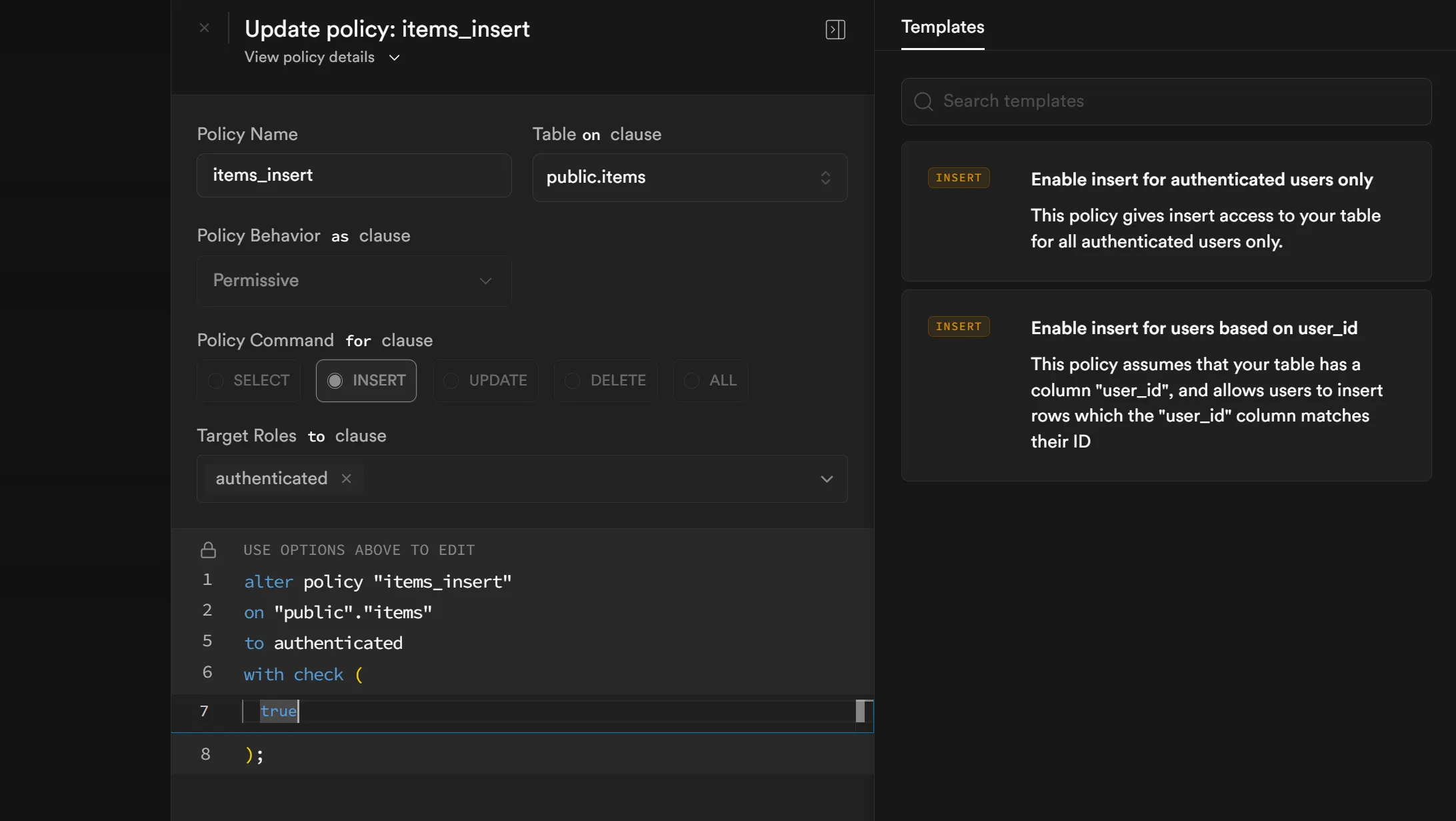
-
After step 4 — SQL Editor. Run the typed-handoff chain join query against the now-populated tables. The result collapses the chain (extracted invoice → approved item → assigned GL codes) into a single result set — the structured-output-as-queryable moment.
-
After step 6 — Realtime → Inspector. Subscribe to Postgres Changes on
public.itemsdirectly from Studio. With the inspector open, runnpm run trigger:extractionsagainst a fresh source upload; watch the INSERT event arrive in the inspector pane in real time, alongside the same event firing into the recipe’s React UI. Demystifies what Postgres Changes look like on the wire.Screenshot pending — capture once Studio’s Realtime Inspector tab is wired up.
-
After step 7 — Realtime → Inspector (presence). Open an item in two browser windows and inspect the per-item presence channel from Studio. The inspector shows
track,sync, andleavepayloads exchange while the app’s avatars update — wiring the abstract “Presence” feature to the concrete WebSocket frames.Screenshot pending — capture once Studio’s Realtime Inspector tab is wired up.
Studio’s UI evolves; readers should re-capture from their own project for accuracy.
Run it
Section titled “Run it”See run.md for the full setup-and-run sequence.
Variations
Section titled “Variations”- Production-grade agent authorship under RLS — replace the v1
“trust the client” mechanic for chat /
extraction_attemptsinserts with a server-mediated path (Edge Function or RPC that signs agent messages against a session-scoped token). Closes the spoofing gap flagged below in Platform notes. Its own follow-on recipe. - Role-based escalation chain — add admin / CFO roles; high-value
items (
needs_cfo_review = true) require a second approval step. The most natural follow-on; about one short PR’s worth of work on top of this recipe. - PDF text-layer + bbox highlighting — replace the page-image viewer with PDF.js + the platform’s source bbox metadata; clicking a structured field scrolls the PDF to the cited region. Its own follow-on recipe.
- Domain swap — replace invoices with claims, contracts, or resumes. The schema + extractor change; everything else (queue, presence, HITL flow) is unchanged.
- Auto-approval threshold tuning — surface the threshold (0.85) and arithmetic tolerance ($0.02) as a settings UI; let admins adjust per category.
- Real downstream actions — replace the GL-coder’s recipe-side database write with a real sink: write to QuickBooks, generate a bank-payment file, push to an ERP.
- Webhook-driven trigger — replace the recipe-side polling for
newly-extracted sources with a Postgres trigger or Edge Function that
fires the extractor on
ai.sourcesinsertion. - Typing indicators / cursor sharing — Broadcast for ephemeral signals; not load-bearing but a polish beat. (This recipe uses Postgres Changes + Presence and intentionally skips Broadcast — the lesson is sharper with structured rows carrying the load.)
Platform notes
Section titled “Platform notes”A few v1 caveats — none block running the recipe, but a security-minded reader should know what’s traded off.
- Client-trusted agent authorship. The
chat_insertandattempts_insertpolicies have a real hole: an authenticated reviewer can craft a request that inserts achat_messagesrow withauthor_idset to any agent profile, with no constraint linking that row to an actual agent run. The recipe’s mechanic relies on the client orchestrating the@agent→ field-extractor-call → field-patch sequence, and adding signing/mediation would obscure the lesson. A production system would route agent-authored writes through a server-side mediator (Edge Function or RPC) that verifies the prior@agentmention exists and signs the agent’s reply against a session-scoped token. Linked from the Variations section above. - GL-coder fires client-side after Approve. The Approve button
flips status to
approvedand then calls the GL-coder. If the client crashes between those two calls, the item ends upapprovedwith no GL codes and no automatic retry. Acknowledged. A production system would run the approve-and-code path as a single server-mediated step (a Postgres function that flips status + emits apg_notifyconsumed by an agent runner, or a Postgres trigger that invokes the agent runtime via a webhook). - Page-image viewer is page-image-only. No bbox-aware highlighting, no clickable citations, no synchronized scrolling between the form and the PDF. Page images plus the structured form beside them are enough to teach realtime + HITL + structured output without the PDF.js + coordinate-mapping rabbit hole. Deferred to a follow-on recipe (see Variations).
Related recipes
Section titled “Related recipes”- Recipe 01 — Multi-agent customer support team (Supervisor): the multi-agent orchestration story. Read it first if “agents” + “compose multiple in a workflow” is new — the agent-provisioning, KB-uploads, and seed-script patterns aren’t re-taught here.
- Recipe 04 — AI ticket auto-triage with vision + DB tool (when published): the full-auto sibling of this recipe; visual ticket inputs, no HITL queue.
- Recipe NN — Production-grade agent authorship under RLS (when published): replaces this recipe’s client-trusted authorship with server-mediated signing. Direct successor.