
Multi-agent customer support team
Multi-agent customer support team
Section titled “Multi-agent customer support team”End-users sign in to a small chat web app and ask support questions. A Supervisor orchestration decides which of three specialized agents (billing / technical / product) should handle each question, delegates the work, and streams the answer back. Each user picks up their own conversation when they return. A side panel shows the live orchestration trace so you can watch the coordinator route, the specialist search its KB, and the response come back together.
Powabase features used
Section titled “Powabase features used”- Sources — upload markdown seed docs into per-domain knowledge bases.
- Knowledge Bases — three KBs (billing, technical, product), each indexed with the default ChunkEmbed strategy.
- Agents — three entity agents, each with a
knowledge_base_searchtool pointed at its own KB. - Orchestrations (Supervisor strategy) — a coordinator agent auto-generated from the entity role descriptions delegates each user message to the right specialist.
- Sessions — implicit Powabase agent session created on the first message; reused across the conversation.
- Streaming (SSE) — the run endpoint streams events back over SSE so the UI can render the trace in real time.
- Auth (GoTrue) + Tables + RLS — end-users sign up with email/password;
each user’s chat history is scoped to them via RLS on a
chat_sessionstable.
Why this combination
Section titled “Why this combination”A single agent with three KBs would technically work, but the answer it produced would be a single LLM averaging across all three domains. A multi-agent orchestration is meaningfully different: the coordinator makes a routing decision based on the role descriptions you write, then delegates the actual reasoning to a specialist agent that has its own focused prompt and a single KB. The resulting answers are domain-precise, the trace is interpretable (“this question went to the billing specialist, which queried the billing KB”), and you can iterate on each specialist’s behavior in isolation.
Per-user chat session metadata lives in an ordinary application
table (public.chat_sessions) with RLS, not in the AI layer. The AI
layer manages the conversation history server-side; the application
table just maps each user to their session ID. This is the idiomatic
Supabase split: app state in public with RLS for per-user access, the
platform handles the rest.
The streaming SSE flow is what makes the multi-agent experience legible to the end user. Without it the UI would show “loading…” for ten seconds and then a wall of text. With the trace panel, the user (and the developer debugging this) sees the coordinator’s decision, the delegation, the tool call, the result — and only then the answer.
Prerequisites
Section titled “Prerequisites”- A Powabase project (this recipe was developed against
cookbook-01) OPENAI_API_KEYset in Project Settings → API Keys- Auth → Advanced Settings → Auto-confirm Email toggled ON (so sign-up immediately establishes a session)
- Node 20+ / npm
psqlCLI for applying schema/policies
Architecture
Section titled “Architecture”┌──────────────┐ SSE ┌──────────────────────────────────────────────────┐│ React app │◀─────────│ POST /api/orchestrations/:id/run/stream ││ (Vite SPA) │ │ ││ │ │ ┌────────────┐ ││ /signin │ │ │ Coordinator│ ││ /signup │ POST │ │ (auto- │ ││ /chat │─────────▶│ │ generated)│ │└──────────────┘ message │ └─────┬──────┘ │ ▲ │ delegate_to_{name} │ │ │ │ │ user JWT │ ┌─────┼─────┬─────────┐ │ (Supabase auth) │ ▼ ▼ ▼ │ │ │ │ billing tech product │ │ ┌────────────┐ │ agent agent agent │ │ │ chat_ │ │ │ │ │ │ │ │ sessions │ │ │ KB search tool │ │ │ (RLS) │ │ ▼ ▼ ▼ │ │ └────────────┘ │ ┌──────────────────┐ │ │ ▲ │ │ KBs: billing / │ │ │ │ persists │ │ technical / │ │ │ │ agent_session_id │ │ product │ │ │ │ │ └──────────────────┘ │ │ │ │ │ │ │ │ │ ▼ │ │ │ │ coordinator │ │ │ │ synthesizes ──────────┘ │ │ │ │ │ └──── SSE: ────────│ ▼ │ │ stream chunks + │ │ trace events ────▶ │ └──────────────────────────────────────────────────┘Build it
Section titled “Build it”Five steps. Run them one by one to see each piece work before adding the
next, or jump straight to npm run seed if you just want everything
provisioned.
npm run step:1 # billing KB + agent → chat with it directlynpm run step:2 # add technical + product specialistsnpm run step:3 # wrap them in a Supervisor orchestrationAll three are idempotent — safe to re-run.
1. Database schema (foundation)
Section titled “1. Database schema (foundation)”schema.sql creates public.chat_sessions — one row per end-user
conversation, with agent_session_id mapping to the Powabase server-side
agent session that holds the actual message history.
create table if not exists public.chat_sessions ( id uuid primary key default gen_random_uuid(), user_id uuid not null references auth.users(id) on delete cascade, agent_session_id text not null, title text, created_at timestamptz not null default now(), updated_at timestamptz not null default now());policies.sql turns on RLS so each user reads/writes only their own rows.
create policy chat_sessions_self_all on public.chat_sessions for all using (auth.uid() = user_id) with check (auth.uid() = user_id);Apply with psql "$DATABASE_URI" -f schema.sql -f policies.sql.
2. One specialist: a knowledge base + an agent that searches it
Section titled “2. One specialist: a knowledge base + an agent that searches it”Start with one knowledge base and one agent that searches it.
Create the billing knowledge base:
const kb = await api("/api/knowledge-bases", { method: "POST", body: JSON.stringify({ name: "billing-kb", description: "Billing policies, refund procedures, payment handling, tax info.", indexing_strategy: "chunk_embed", embedding_model: "text-embedding-3-small", }),});Upload the markdown seed docs and wait for each one to finish extracting:
for (const file of await readdir("seed-content/billing")) { const src = await uploadSource(kb.id, join("seed-content/billing", file)); await pollSourceReady(src.id); // poll /api/sources/:id until extracted}Create the agent. The knowledge_base_search tool wires this agent to
the KB; the agent calls it as part of its ReAct loop.
const agent = await api("/api/agents", { method: "POST", body: JSON.stringify({ name: "billing-agent", model: "gpt-5.4-mini", system_prompt: BILLING_PROMPT, // see step1-billing.ts for the full prompt settings: { reasoning_effort: "medium" }, tools: [{ type: "knowledge_base_search", knowledge_base_id: kb.id }], }),});Run npm run step:1. The script provisions the resources (or detects
they exist) and then chats with the agent directly via
POST /api/agents/:id/run:
→ Asking billing-agent directly: "What's the refund window for Pro plan?"
--- billing-agent's answer ---[the agent calls knowledge_base_search, finds the policy, and answers]
Everything that follows is composition.
3. Add two more specialists
Section titled “3. Add two more specialists”Repeat the step-2 pattern for technical-kb + technical-agent and
product-kb + product-agent. Each agent has its own focused system
prompt and exactly one KB.
for (const domain of [TECHNICAL, PRODUCT]) { const kb = await api("/api/knowledge-bases", { method: "POST", body: JSON.stringify({ name: `${domain.name}-kb`, /* ... */ }), }); for (const file of await readdir(domain.contentDir)) { const src = await uploadSource(kb.id, join(domain.contentDir, file)); await pollSourceReady(src.id); } await api("/api/agents", { method: "POST", body: JSON.stringify({ name: `${domain.name}-agent`, model: "gpt-5.4-mini", system_prompt: domain.agentPrompt, tools: [{ type: "knowledge_base_search", knowledge_base_id: kb.id }], }), });}Run npm run step:2. The script chats with each new agent in turn so
you can see them answer within their own domains.
You now have three independent specialists. To get the right answer to a user, your application would have to know which agent to ask for each question — i.e., write the routing yourself. Step 4 removes that.
4. Compose with a Supervisor orchestration
Section titled “4. Compose with a Supervisor orchestration”A Supervisor orchestration is a coordinator agent that the platform auto-builds for you, given a list of specialist agents and a one-line description of what each one does. The coordinator’s only job is to read the user’s question and pick the right specialist (or specialists) to delegate to.
You don’t write the coordinator’s prompt. The platform builds it from:
- the orchestration’s
description(interpolated as “You are an orchestrator for: …”), - each entity’s
role_description(becomes adelegate_to_<name>tool with that text as its description), - optional
orchestrator_config.additional_instructions(appended for behavioral nudges).
Create the orchestration with description + behavior nudges:
const orch = await api("/api/orchestrations", { method: "POST", body: JSON.stringify({ name: "Customer Support Team", description: "Acme Corp customer support. Route each end-user question to the right " + "specialist (billing, technical, or product) and return a synthesized answer.", strategy: "supervisor", orchestrator_config: { additional_instructions: "Default to delegating. Do not answer from general knowledge — that is " + "the specialists' job. Pick the single most likely specialist; only fan " + "out when the question genuinely spans domains. Synthesize in your own voice.", reasoning_effort: "medium", }, }),});Attach each specialist as an entity. The role_description is what the
coordinator sees as the delegation tool’s description — vague role
descriptions produce vague routing.
for (const { agentName, role } of ROLES) { const agent = await findAgentByName(agentName); await api(`/api/orchestrations/${orch.id}/entities`, { method: "POST", body: JSON.stringify({ entity_type: "agent", entity_ref_id: agent.id, role_description: role, }), });}Run npm run step:3. The script asks the orchestration the same kinds
of questions you previously had to route by hand — but now you talk to
one endpoint (/api/orchestrations/:id/run/stream) and the
coordinator routes:
→ Asking the orchestration: "What's the refund window for Pro plan?"  delegated to: billing-agent  answer: [synthesized from the billing-agent's KB-grounded response]
→ Asking the orchestration: "How do I authenticate against your API?"  delegated to: technical-agent  answer: …
→ Asking the orchestration: "What's the difference between Business and Enterprise?"  delegated to: product-agent  answer: …
The routing came from the role descriptions you wrote — you didn’t have to author the coordinator’s prompt. Step 5 wires this same endpoint into a chat UI.
5. Build the React app (runtime)
Section titled “5. Build the React app (runtime)”The Vite app under code/ has three pages (/signin, /signup,
/chat) and one chat component. Auth uses @supabase/supabase-js
directly:
import { createClient } from "@supabase/supabase-js";export const supabase = createClient( import.meta.env.VITE_POWABASE_URL, import.meta.env.VITE_POWABASE_ANON_KEY,);The chat hits the orchestration’s run/stream endpoint with the user’s JWT — same call pattern step 3 made from Node, but with auth headers instead of the service-role key:
const res = await fetch( `${BASE_URL}/api/orchestrations/${ORCH_ID}/run/stream`, { method: "POST", headers: { apikey: ANON_KEY, Authorization: `Bearer ${userToken}`, "Content-Type": "application/json" }, body: JSON.stringify({ message, session_id }), },);The SSE response is parsed frame-by-frame. On the start event the chat
captures session_id and persists it to chat_sessions so the next
message in the same browser tab reuses the same conversation. Each
delegation_started / tool_call / content_delta event is rendered
in the trace panel — that’s how the user sees which specialist
answered and what the coordinator did to get there.
Inspect in Studio
Section titled “Inspect in Studio”After npm run seed and a few chat turns, four moments worth screenshotting:
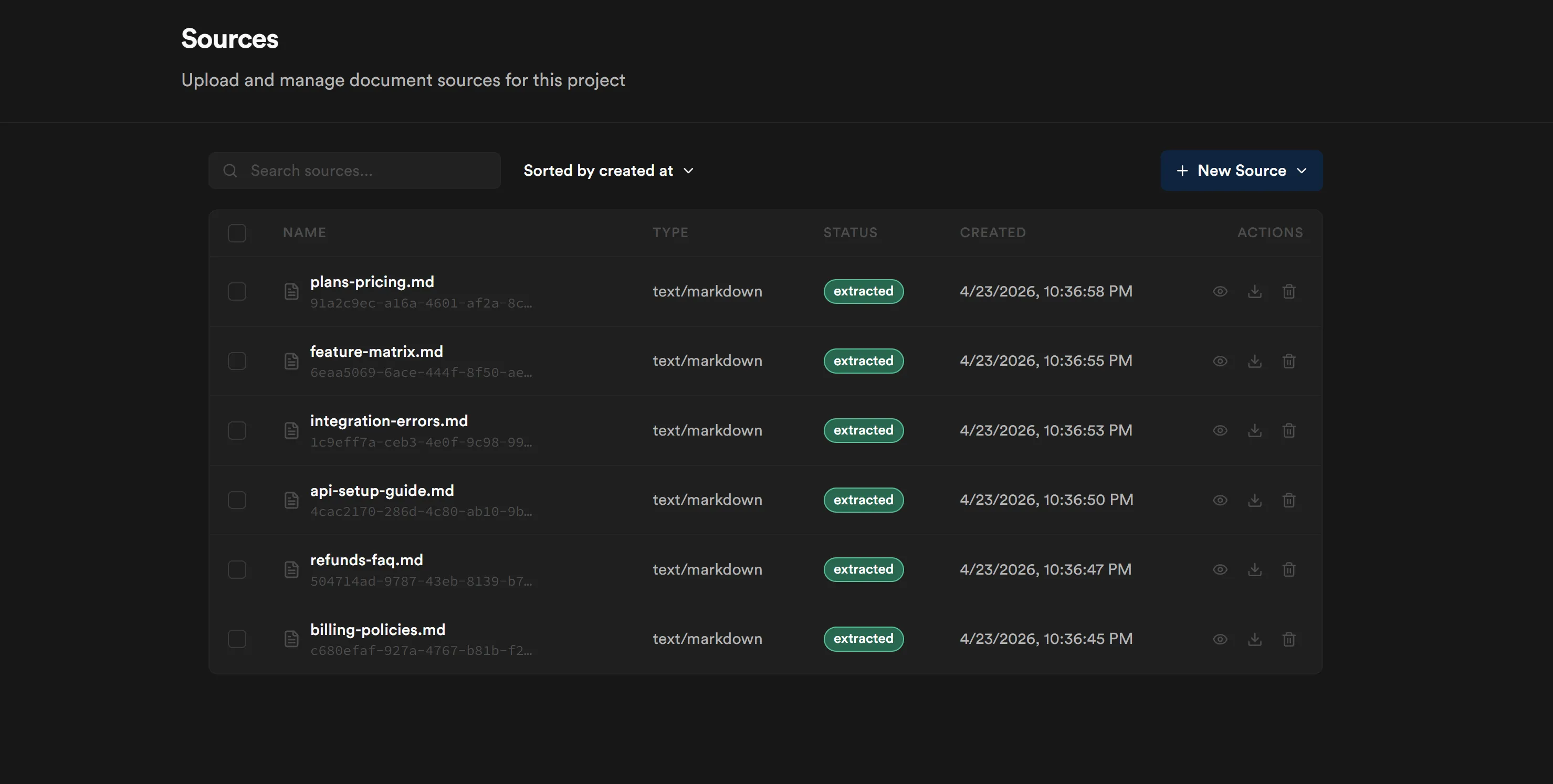
-
Sources page — six markdown files extracted across three KBs. Confirms ingestion worked.
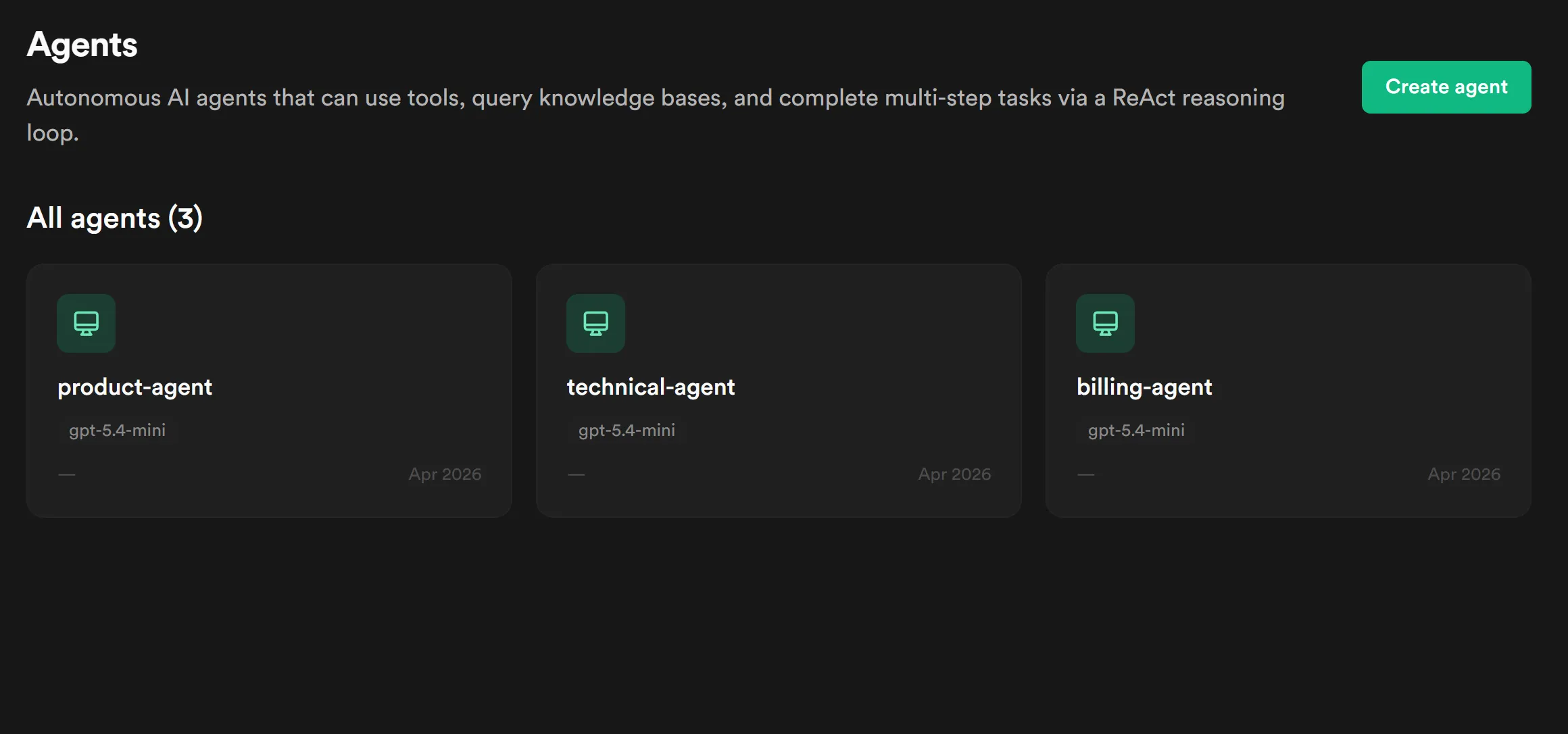
-
Agents list — three specialized agents with their role descriptions visible. The coordinator agent does not appear here; it’s auto-built by the orchestration each run.
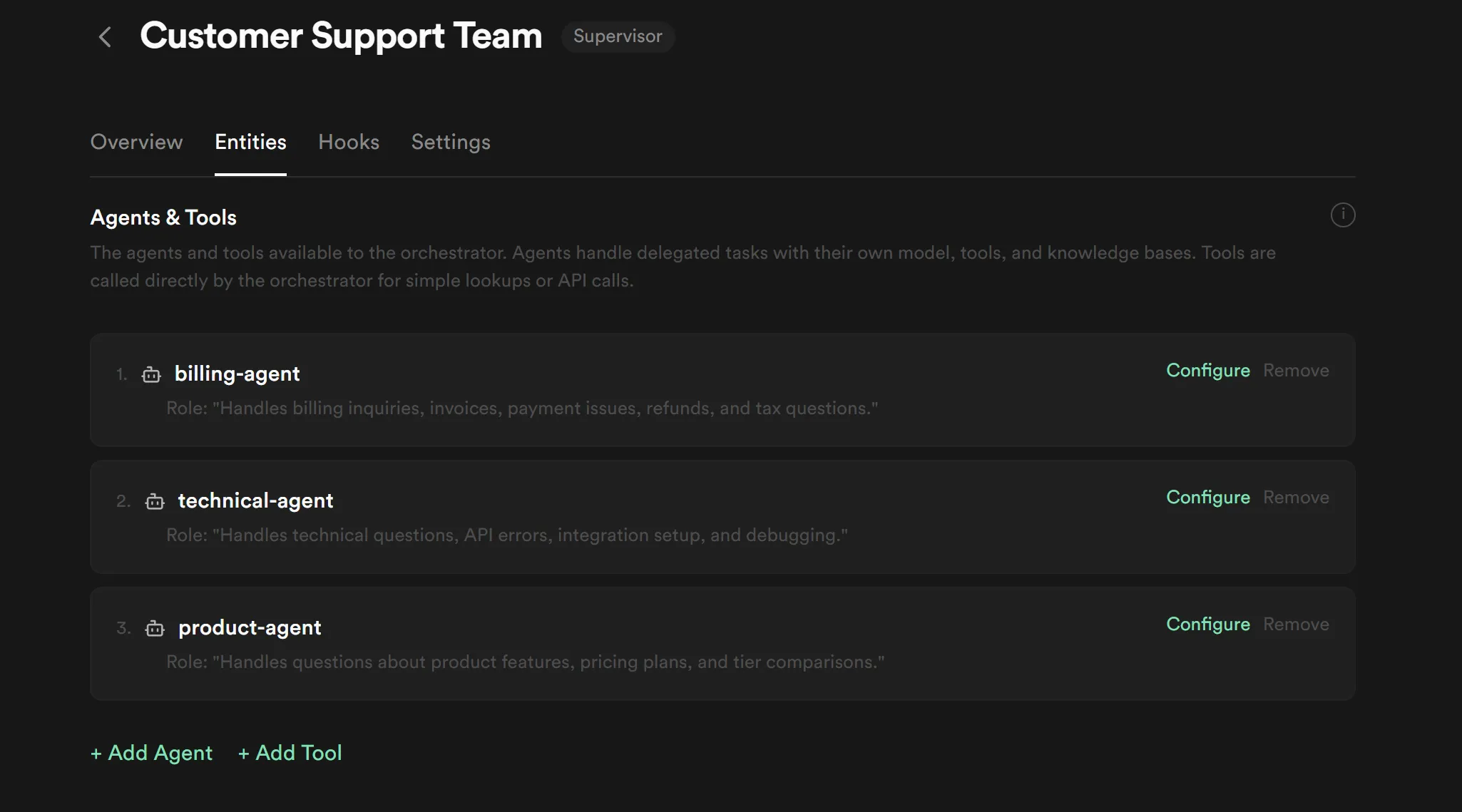
-
Orchestration detail — the orchestration with Supervisor strategy and three attached entities. The role descriptions on the entity rows are what the coordinator uses for routing.
-
Runs page — drill into a specific run’s trace and see the delegation chain: coordinator →
delegate_to_{name}→ entity sub-run → tool call → result → coordinator’s synthesis.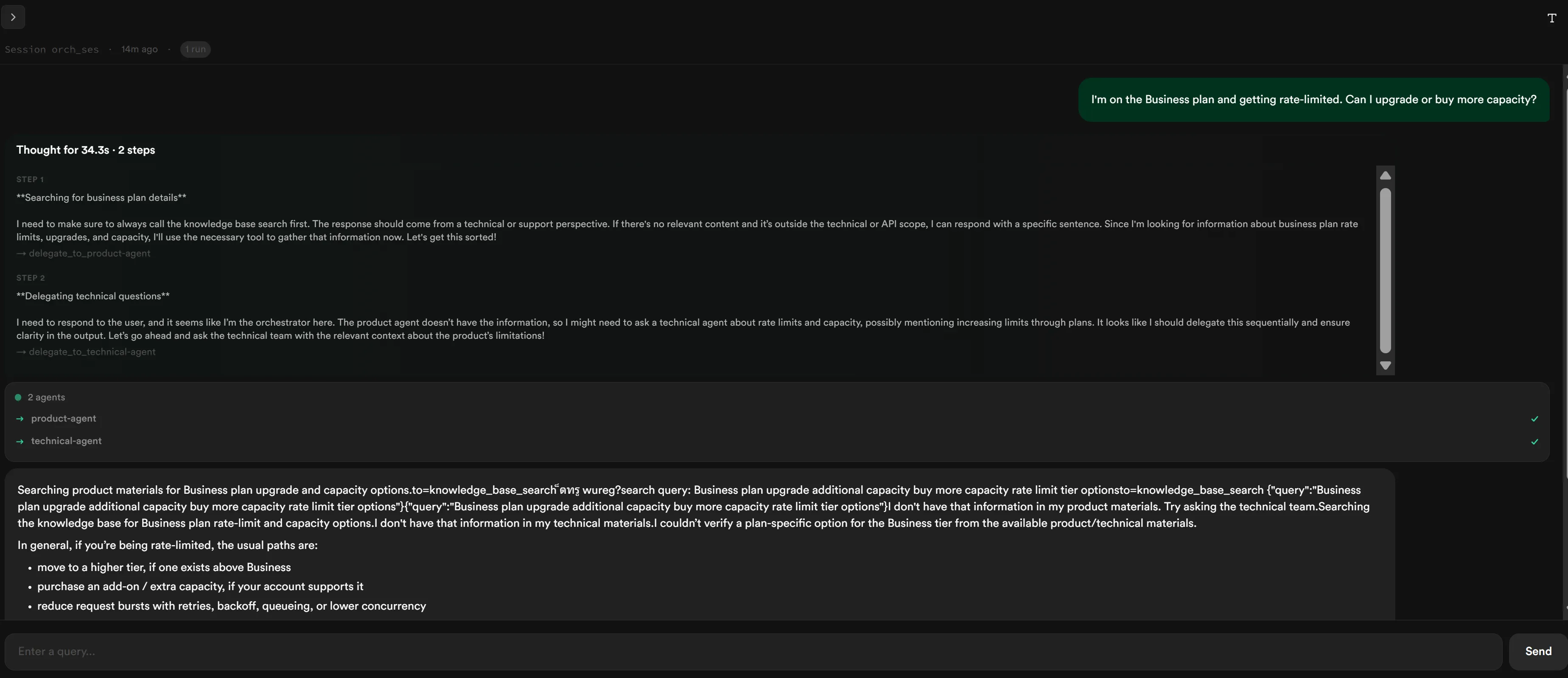
Studio’s UI evolves; if these screenshots look outdated against your current install, re-capture from your own project.
Run it
Section titled “Run it”See run.md for the full setup-and-run sequence, including
the seed step (which you only run once per project) and the dev-server
flow.
Variations
Section titled “Variations”- Use Sequential or Parallel orchestration strategy. The seed creates a
Supervisor orchestration; swap
strategy: "supervisor"for"sequential"to make the three agents run as a pipeline (extract → analyze → synthesize) or"parallel"to fan-out and merge. - Add a fourth domain. The seed-content/ structure is open — add a
seed-content/security/directory with a few docs, append a fourthDomainentry inseed-agents.ts, re-runnpm run seed. The coordinator picks up the new entity automatically. - Switch to a different LLM provider. Change
model: "gpt-5.4-mini"inseed-agents.tsto any LiteLLM-supported model (Claude, Gemini, etc.) and set the corresponding API key in Project Settings → API Keys. See the project’s settings registry for the current allow-list of models. - Enable reasoning streaming. The trace panel renders
reasoning_deltareasoningevents from the platform — but the platform only emits them when the model supports reasoning (e.g. GPT-5.x or Claude-with-thinking) ANDreasoning_effortis set on the orchestration’sorchestrator_configand/or each agent’ssettings.cleanup-and-enable-reasoning.tsshows how to PUTorchestrator_config: { reasoning_effort: "medium" }. Pair that with a reasoning-capable model and the trace will fill with thinking content.
- Improve KB retrieval on tabular content. This recipe uses the default
ChunkEmbed strategy. Tables in markdown (e.g., the rate-limit table in
api-setup-guide.md) don’t always retrieve cleanly. For document-structure-heavy KBs, tryindexing_strategy: "page_index"or"graph_index"in the KB creation call. - Add tools beyond knowledge_base_search. Each entity agent can be given additional tools (DB query, custom HTTP, MCP servers). Recipe 04 shows an agent with a database-query tool.
- Persist messages, not just sessions. The current recipe stores only
the
agent_session_idper user; on reload it rejoins the same session but messages are fetched fromGET /api/sessions/:id/messages. To display history offline or do server-side analytics, also store messages in your own table.
Platform notes
Section titled “Platform notes”- Tabular content retrieval with ChunkEmbed produces mixed results for
questions that target small numeric values inside markdown tables (e.g.,
the rate-limit table in
seed-content/technical/api-setup-guide.md). After the prompt iteration inpatch-prompts.ts, the agents now refuse honestly when retrieval fails rather than hallucinating a plausible number — but the retrieval gap remains. Documented above as a Variation (PageIndex / GraphIndex indexing strategies are better fits).
Related recipes
Section titled “Related recipes”- Recipe 02 — HITL invoice extraction queue: stacks on this recipe’s patterns — agents as real auth.users rows, per-domain prompts, knowledge bases — and adds realtime + presence + multi-user editing in a human-in-the-loop workflow. Read this one first; Recipe 02 doesn’t re-teach the orchestration basics.
- Recipe 04 — AI ticket auto-triage with vision + DB tool (when published): a different agent shape — autonomous, non-conversational, writes back to your tickets table.